Grabage: The Playful Font That Brings Personality to Your Designs
If you're looking for a font that adds a little whimsy and charm to your creative projects, Grabage might be just what you need. This unique, cut-out style font is perfect for zines, logos, social media graphics, and any design that benefits from a relaxed, fun vibe. But while Grabage is undeniably charming, it's not always the best choice for every project. Understanding its strengths and limitations can help you make smarter design decisions.
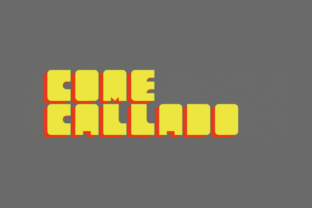
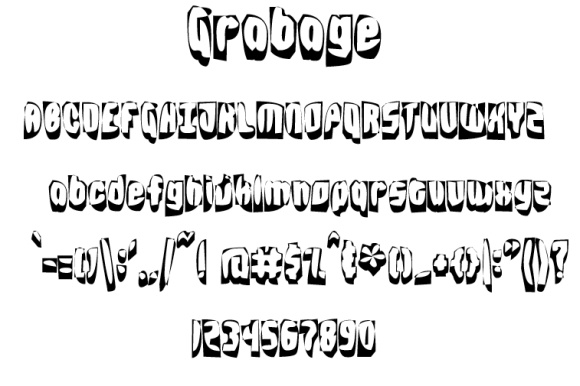
Grabage isn't your typical serif or sans-serif font. It has a hand-drawn, almost handmade feel that makes it stand out. Its irregular shapes and playful lines give it a casual, laid-back aesthetic. This makes it ideal for branding that wants to feel approachable and creative. However, its informal nature can also be a double-edged sword if used in the wrong context.
The Appeal of Grabage: Why It Works in Certain Situations
Grabage's appeal lies in its ability to add character without overwhelming a design. It's often used in indie publications, event flyers, and personal branding where a more organic look is desired. For example, a small business owner creating a custom t-shirt design might choose Grabage to give their brand a more personal, artisanal feel. Similarly, a blogger writing about creativity could use it in a header to evoke a sense of fun and experimentation.
Another benefit of Grabage is its versatility. While it's not suitable for long blocks of text, it works well as a headline or accent font. This means you can pair it with more traditional fonts to balance its informality. For instance, using Grabage for a title and a clean sans-serif like Helvetica for body text can create a visually appealing contrast that draws attention without sacrificing readability.
Misconceptions About Grabage: What People Often Get Wrong
One common mistake is assuming that Grabage is a one-size-fits-all solution. While it's great for certain types of projects, it's not always the best choice. For example, using it in a corporate presentation or a formal document can make the content seem unprofessional. The font's irregular shapes and lack of structure may confuse readers or make the message less clear.
Another misunderstanding is thinking that Grabage is easy to use without any preparation. In reality, it requires careful consideration of spacing, size, and surrounding elements. If not properly adjusted, the font can look messy or inconsistent. For instance, if you're designing a poster with Grabage as the main text, you'll need to ensure that the letters are spaced evenly and that they don't clash with other design elements.
Some users also overlook the importance of testing Grabage in different formats. A font that looks great on a screen might not translate well to print. High-resolution printing can reveal imperfections in the font's design, such as jagged edges or inconsistent strokes. Always test your designs in both digital and physical formats before finalizing them.
Common Mistakes and How to Avoid Them
One of the most frequent errors is overusing Grabage. While it's tempting to use it everywhere, doing so can dilute its impact. Instead, use it strategically. For example, apply it to headings, logos, or short phrases rather than long paragraphs. This keeps the design cohesive and ensures that the font remains a standout element rather than a distraction.
Another mistake is not considering the audience. If your target audience expects a more polished or professional look, Grabage may not be the right choice. On the other hand, if your audience values creativity and individuality, Grabage can be a powerful tool. Always align your font choices with your brand's voice and the expectations of your audience.
Some users also fail to check the licensing terms before downloading or purchasing Grabage. Not all fonts are free for commercial use, and using a restricted font without permission can lead to legal issues. Always review the license agreement carefully and consider purchasing a commercial license if needed.
What to Check Before Using Grabage
Before incorporating Grabage into your design, there are several factors to consider. First, evaluate the purpose of your project. Is it for a casual event, a personal blog, or a professional website? The answer will determine whether Grabage is appropriate. Second, test the font in different sizes and contexts. Does it look good at 36pt? At 12pt? How does it appear next to other fonts?
Also, pay attention to the overall design. Does Grabage complement the rest of your layout, or does it clash? If you're unsure, try pairing it with a neutral font to see how it interacts. Finally, ensure that the font is legible. Even though Grabage is meant to be playful, it should still be readable in the intended context.
Alternatives to Grabage: When to Choose Something Else
If Grabage doesn't fit your needs, there are other fonts that offer similar personality without the same limitations. For example, fonts like Comic Sans or Quicksand can add a friendly tone to your designs. However, these fonts have their own quirks and may not be suitable for all situations. The key is to find a font that matches your project's goals and audience.
In some cases, a more structured font might be better. If you're working on a design that requires clarity and professionalism, a simple serif or sans-serif font could be a safer choice. The goal is to find the right balance between creativity and functionality.
Ultimately, Grabage is a fun and expressive font that can bring life to your designs when used correctly. By understanding its strengths and limitations, you can avoid common pitfalls and make informed decisions that enhance your work. Whether you're a designer, marketer, or hobbyist, taking the time to explore and experiment with Grabage can lead to more engaging and effective visual communication.